
Convert Sony ARW to JPG Online
Need to turn a Sony ARW file into JPG? ARW is Sony's RAW format, used across the Alpha (a7, a9, a1, a6000-series) and RX lines. It is built on the TIFF/EP standard and replaced Sony's earlier SR2 format that came from the Konica Minolta lineage Sony absorbed in 2006. Sony has revised ARW internally over the years - adding lossless and lossy compression options - while keeping the same extension, so a single .arw can mean several underlying variants. It remains Sony's current, actively maintained RAW format. JPG (also written JPEG) is the world's most widely supported photo format. It uses lossy compression that throws away detail the eye barely notices, which keeps photographic files small while staying compatible with virtually every device, browser and app. Converting from Sony ARW to JPG bridges the two: you keep the picture, but in a format that fits where you are taking it.
Drop a Sony ARW file or browse
Up to 16 MB

Create a free account to convert and save your files.
Why convert Sony ARW to JPG?
Sony shooters convert ARW to JPG because the files are large and not natively viewable on most phones or web platforms, so a JPG is the practical way to post or email a finished frame.
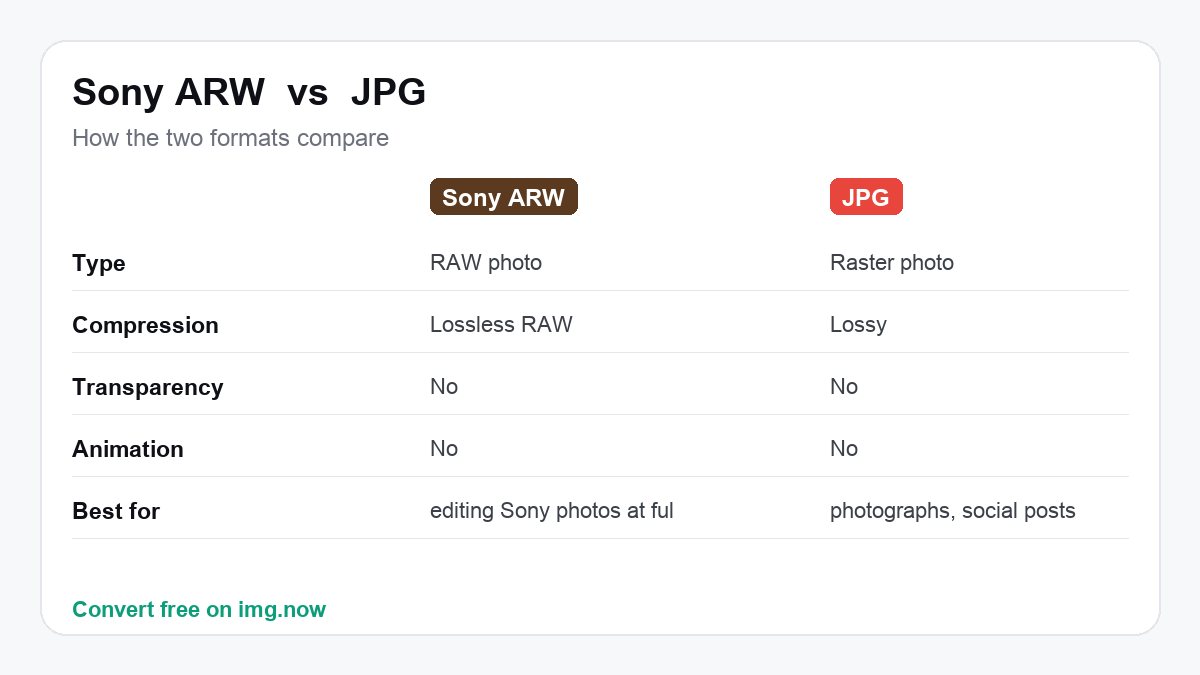
| Sony ARW | JPG | |
|---|---|---|
| Type | RAW photo | Raster photo |
| Compression | Lossless RAW | Lossy |
| Transparency | No | No |
| Animation | No | No |
What to expect converting Sony ARW to JPG
Expect a much smaller file - JPG's compression typically cuts size several times over versus Sony ARW.
JPG is a compressed format; img.now encodes at high quality so the result stays sharp.
Use JPG when you need photographs, social posts and anything that needs to open everywhere.
Keep Sony ARW when you still need editing Sony Alpha mirrorless and DSLR/SLT bodies, plus Cyber-shot RX compacts captures at full quality, then converting to JPG to share.
About Sony ARW and JPG
Sony ARW
ARW is Sony's RAW format, used across the Alpha (a7, a9, a1, a6000-series) and RX lines. It is built on the TIFF/EP standard and replaced Sony's earlier SR2 format that came from the Konica Minolta lineage Sony absorbed in 2006. Sony has revised ARW internally over the years - adding lossless and lossy compression options - while keeping the same extension, so a single .arw can mean several underlying variants. It remains Sony's current, actively maintained RAW format.
- Keeps Sony's high-dynamic-range sensor data
- Full latitude to recover exposure and white balance after the shot
- Lossless original capture from Sony Alpha mirrorless and DSLR/SLT bodies, plus Cyber-shot RX compacts
JPG
JPG (also written JPEG) is the world's most widely supported photo format. It uses lossy compression that throws away detail the eye barely notices, which keeps photographic files small while staying compatible with virtually every device, browser and app.
- Opens everywhere - Universal support
- Small files for photographs
- Ideal for email, web and sharing
Convert Sony ARW to JPG in three steps
Upload your Sony ARW
Drop in a Sony ARW file from your device, up to 16 MB. Sony ARW files are read automatically.
We convert it to JPG
img.now re-encodes your image as JPG at full resolution on our servers - No quality lost to resizing.
Download the JPG
Grab the result instantly. It is also saved to your files so you can come back to it.
Do more with your JPG
Once it is converted, keep editing in the same workspace.
Need a different conversion? Browse all file converters.
Sony ARW to JPG - Questions
What is a Sony ARW file?
Why convert Sony ARW to JPG instead of keeping Sony ARW?
Will I lose quality converting Sony ARW to JPG?
Why won't my ARW files open on my computer?
Does Sony use the same ARW format for every camera?
Should I shoot ARW or JPG on my Sony?
Is converting Sony ARW to JPG free?
Will the quality drop when I convert Sony ARW to JPG?
Do you keep my files?
Do more than convert
img.now also generates images from text, upscales, removes backgrounds and edits - All in one workspace, saved to your account.
Create a free account