
Ad banners in every IAB size, in seconds
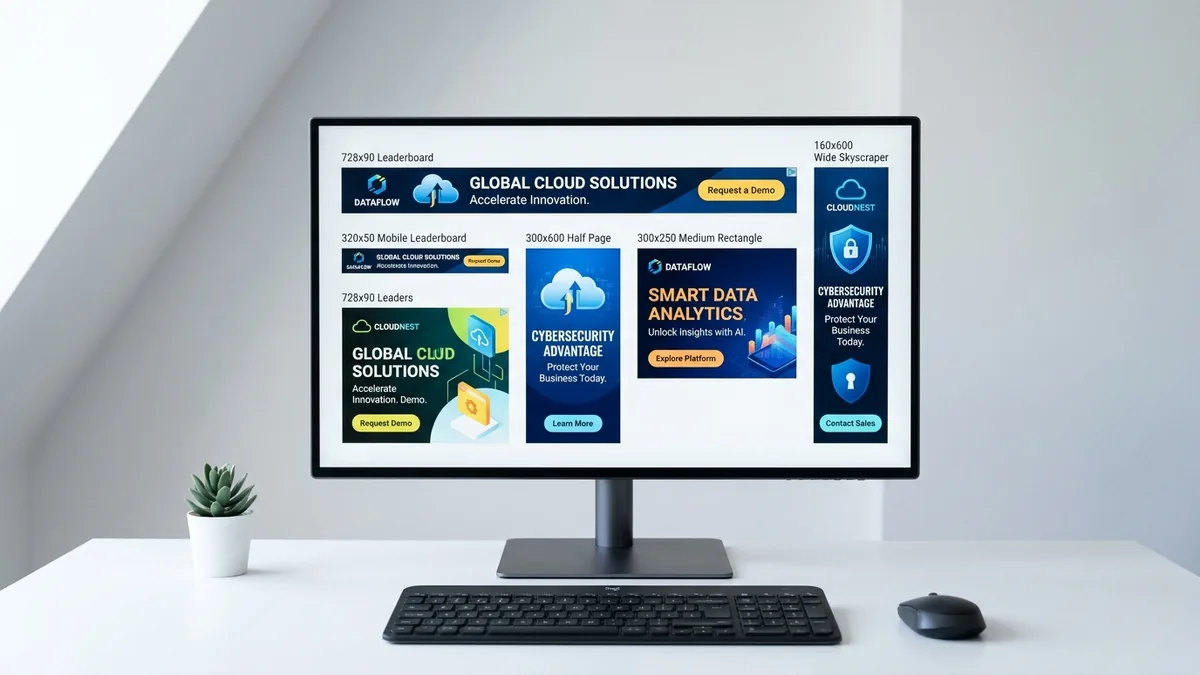
Write a prompt, pick a format — the AI composes at the correct aspect ratio, then delivers a crisp, pixel-exact creative your ad network can upload directly. No Photoshop, no resizing, no quality loss.
Sharp, on-brief banner ads — zero design experience needed
Write a prompt, pick an IAB size, and get a pixel-exact creative in seconds. The AI generates at exactly the right aspect ratio for each format — composing the scene for a leaderboard strip or a tall half-page, not repurposing a landscape — then downscales with Lanczos sharpening to deliver clean, crisp output.
- 10 IAB sizes from 320×50 mobile strip to 970×250 billboard — exact pixels, no resizing
- Upload directly to Google Ads, Meta, DV360, The Trade Desk, or any DSP
- Multiple styles — Photographic, Product, Minimal, Cinematic, and more
- CC0 output — your banners, no watermarks, no attribution required
How the banner maker works
Three steps from prompt to pixel-perfect creative.
Choose your format
Select from 10 IAB-standard sizes - From a mobile strip at 320×50 to a billboard at 970×250. Every major ad network accepts these dimensions out of the box.
Describe your creative
Write a prompt for the image you want inside the banner. Pick a visual style - Photographic, Product, Minimal, Cinematic, and more. Be specific about subject, mood, and colour palette.
Download and use
The AI generates at exactly the right dimensions for your chosen format — composing a leaderboard as a strip, not a landscape crop. The server then downscales with Lanczos sharpening to deliver a crisp, upload-ready PNG at exact IAB pixel dimensions.
What you can make
Product ads
Clean, high-contrast product shots on white or gradient backgrounds. Use Product or Photographic style with a concise subject description.
Try this promptBrand awareness
Cinematic or illustrative scenes that communicate your brand's personality. Great for top-of-funnel display campaigns on the Google Display Network.
Try this promptSeasonal campaigns
Generate on-brand creatives for Black Friday, Christmas, Valentine's Day, or summer sales without a design team. Swap the prompt, regenerate in seconds.
Try this promptMobile campaigns
Mobile Banner (320×50) and Large Mobile Banner (320×100) formats for in-app and mobile web. Minimal, bold compositions work best at these compact sizes.
Try this promptDisplay advertising by the numbers
Display advertising is the backbone of programmatic media buying. The 300×250 medium rectangle alone accounts for nearly 40% of all display impressions served globally - It is the creative the internet runs on. Getting your banner image right is not a design luxury; it is a performance lever.
Every stat on the right reflects the current state of the industry according to IAB, eMarketer, and Google's own publisher data.
Standard IAB banner sizes
The Interactive Advertising Bureau defines a core set of dimensions that every major ad network - Google Ads, Meta, The Trade Desk, and others - Accepts. Using these standard sizes means your creative is compatible out of the box. The table below is a handy reference; the generator outputs all of them at exact pixel dimensions.
| Format name | Dimensions (px) | Aspect ratio | Type | Common placement |
|---|---|---|---|---|
| Medium Rectangle | 300×250 | 1.2 : 1 | Display | Most popular |
| Leaderboard | 728×90 | 8.09 : 1 | Display | Top of page |
| Half Page | 300×600 | 0.5 : 1 | Display | High impact |
| Billboard | 970×250 | 3.88 : 1 | Display | Large desktop |
| Wide Skyscraper | 160×600 | 0.27 : 1 | Display | Sidebar |
| Large Rectangle | 336×280 | 1.2 : 1 | Display | In-content |
| Square | 250×250 | 1.0 : 1 | Display | Flexible |
| Large Mobile Banner | 320×100 | 3.2 : 1 | Mobile | Mobile top |
| Mobile Banner | 320×50 | 6.4 : 1 | Mobile | Mobile strip |
| Super Leaderboard | 970×90 | 10.78 : 1 | Display | Extra wide |
8 rules for banner creatives that convert
Tested principles from the display advertising industry.
- One hero subject per banner
Busy scenes lose legibility at 300×250 and are devastating at 728×90. Pick a single focal point and build the image around it.
- Embrace whitespace
Especially for leaderboards and mobile strips. A generous negative-space background makes your CTA layer stand out after you add text in your editor.
- Generate 3–5 variants before finalising
Slight framing and lighting differences between variants can change click-through rates by 20–40%. Run them as A/B or multivariate tests in your ad platform.
- Match the banner mood to your landing page
Visual discontinuity between ad and destination raises bounce rate. Use the same colour temperature and tone in your prompt as you use on your landing page hero.
- Choose your style deliberately
Use Product or Minimal for direct-response ads, Photographic for trust-building, and Cinematic for brand-awareness campaigns at the top of funnel.
- Keep focal points central
For mobile and in-app placements, publishers frequently apply an additional 10% safe-zone crop on the top and bottom. Central composition survives this.
- Download and upload as-is
The generator outputs exact IAB pixel dimensions. No resizing needed. Drop the PNG directly into Google Ads, Meta, DV360, or any DSP.
- Describe the image — not the text
AI-generated text inside images distorts and is unreadable at small sizes. Describe only the visual scene; overlay your headline, CTA, and logo in Canva, Photopea, or your own editor after downloading.
Pre-launch creative checklist
Run through these before uploading to your ad network.
- Banner dimensions match the exact spec your network requires (check the table above)
- Image focal point is centred - Safe-zone crop won't cut off your subject
- High contrast between subject and background - Readable at thumbnail scale
- You have at least 3 size variants ready (300×250, 728×90, 160×600 cover 70 %+ of placements)
- Your copy layer (headline + CTA text) is ready to overlay in a separate tool
- Landing page visual tone matches the banner - Consistent colour temperature, no jarring style switches
- Downloaded file size is within network limits (Google Ads: 150 KB; Meta: 1 MB per image)
Tips for strong ad creatives
The best banner images are simple and high-contrast. One clear subject on a clean background outperforms a busy scene that compresses badly at small sizes. Use Product or Minimal for clean CTA banners, and Photographic or Cinematic for brand campaigns.
For every format — from the ultra-wide Leaderboard (728×90) to the tall Half Page (300×600) — the AI generates at the correct aspect ratio so the composition is built for the actual banner shape. A leaderboard is generated as a wide strip; a skyscraper is generated tall. The result is then downscaled with a Lanczos sharpening pass to deliver clean, crisp pixels.
Regenerate two or three variants before adding your copy layer - Slight differences in lighting, angle, and composition dramatically change how a banner feels.