
Convert TIFF to PDF Online
Need to turn a TIFF file into PDF? TIFF is a flexible, high-quality format favoured in print, scanning and archiving. It can hold lossless image data, layers and multiple pages at full fidelity, which is why publishers and libraries rely on it as a master format. PDF is the universal document format - It preserves layout, fonts and images exactly across every device. Turning a PDF page into an image gives you a thumbnail or a shareable picture you can drop into a slide, chat or webpage. Converting from TIFF to PDF bridges the two: you keep the picture, but in a format that fits where you are taking it.
Drop a TIFF file or browse
Up to 16 MB

Create a free account to convert and save your files.
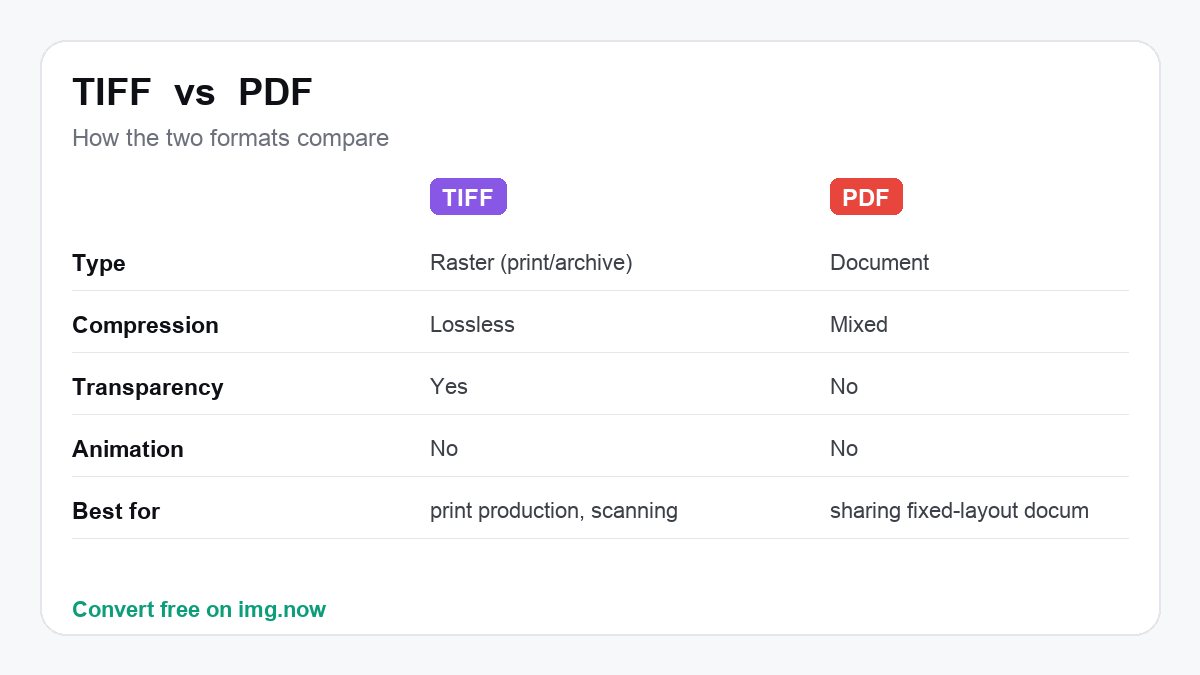
Why convert TIFF to PDF?
People convert TIFF to PDF when they need wider compatibility or a better fit for the job: PDF flattens transparency onto a solid background. img.now keeps the full resolution and uses high-quality encoding so the result stays sharp.
| TIFF | ||
|---|---|---|
| Type | Raster (print/archive) | Document |
| Compression | Lossless | Mixed |
| Transparency | Yes | No |
| Animation | No | No |
What to expect converting TIFF to PDF
The PDF is much smaller than a multi-megabyte TIFF, especially once images are compressed inside.
Pages preserve the image well with optional compression, and multi-page TIFFs map naturally to PDF pages.
You need to share scanned documents or print masters as a portable PDF.
You must keep the lossless TIFF for editing or archival fidelity.
About TIFF and PDF
TIFF
TIFF is a flexible, high-quality format favoured in print, scanning and archiving. It can hold lossless image data, layers and multiple pages at full fidelity, which is why publishers and libraries rely on it as a master format.
- Lossless, print-grade quality
- Supports layers and multi-page
- An archival standard
PDF is the universal document format - It preserves layout, fonts and images exactly across every device. Turning a PDF page into an image gives you a thumbnail or a shareable picture you can drop into a slide, chat or webpage.
- Looks identical everywhere
- One file, many pages
- Universal viewer support
Convert TIFF to PDF in three steps
Upload your TIFF
Drop in a TIFF file from your device, up to 16 MB. TIFF files are read automatically.
We convert it to PDF
img.now re-encodes your image as PDF at full resolution on our servers - No quality lost to resizing.
Download the PDF
Grab the result instantly. It is also saved to your files so you can come back to it.
Do more with your PDF
Once it is converted, keep editing in the same workspace.
Need a different conversion? Browse all file converters.
TIFF to PDF - Questions
What is a TIFF file?
Why convert TIFF to PDF instead of keeping TIFF?
Will I lose quality converting TIFF to PDF?
Is converting TIFF to PDF free?
Will the quality drop when I convert TIFF to PDF?
Do you keep my files?
Do more than convert
img.now also generates images from text, upscales, removes backgrounds and edits - All in one workspace, saved to your account.
Create a free account